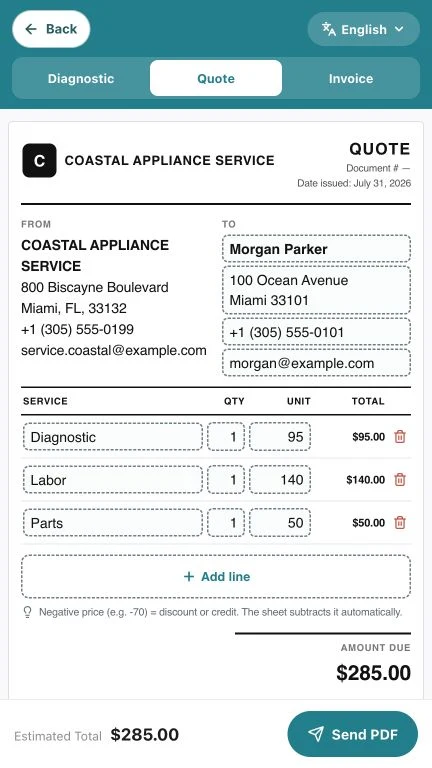
Professional document
When an invoice is complete, the customer understands the charge and the business keeps a useful record for warranties, future visits, and internal control.
Clearly identify your business and the document
Place your business name, logo, phone number, and email where they are easy to recognize. Add a unique invoice number and issue date so the document can be found later without relying on the customer name.
If your jurisdiction requires licenses, tax identifiers, or specific language, confirm those requirements with a local professional. Software organizes the information, but the business remains responsible for fiscal accuracy.
- Business name and logo
- Phone and email
- Unique invoice number
- Issue date
- Tax details when applicable
Include customer details and the service address
The person paying and the address where service was performed may be different. Recording both prevents confusion for managed properties, rentals, or service requested by a third party.
Use the same format on every invoice. Consistency makes history easier to search and reduces errors when another team member reviews the document.
Describe the appliance and the work performed
Include appliance type, brand, model, and serial number when available. Then summarize the reported symptom, diagnosis, and completed work in language the customer can understand.
Avoid vague descriptions such as “general service.” A clear line protects both sides and helps identify whether a future visit involves the same problem or a different one.
- Appliance type and brand
- Available model and serial number
- Reported symptom
- Diagnosis
- Completed repair or final recommendation
Separate labor, parts, taxes, and totals
Itemize enough detail for the total to make sense. Parts should have recognizable descriptions, and labor should reflect the agreed service.
Show subtotal, discounts, applicable taxes, total, and balance. If a deposit or partial payment was made, record how much was received and what remains due.
Important control: verify that subtotal, tax, payments, and balance agree before sending the PDF. A polished document with the wrong total is still a problem.
Deliver a readable copy and keep the history
Generate a readable PDF, share it through an agreed channel, and keep a copy tied to the job. The customer should know what a link opens before tapping it.
Keeping the invoice with the diagnosis, photos, and quote avoids searching through separate conversations when a warranty or new request arrives.
- PDF reviewed before sending
- Message explains what the link opens
- Payment status updated
- Document tied to customer and job
From completed job to a branded PDF
Homi creates invoices with business, customer, and repair details, ready to review and share from a phone.
- Your company logo and details
- Clear line items and totals
- Professional searchable PDF
- History tied to the customer