Working system
The best schedule is not the one with the most appointments. It is the one that lets technicians arrive on time, finish jobs, and keep customers informed without constantly putting out fires.
Capture the complete job on the first call
An appointment that only says “check refrigerator” forces the technician to rebuild the story later. Capture the customer, phone, service address, appliance, brand, symptom, and access limitations while the request is fresh.
The initial information does not need to be a diagnosis. It only needs to give the technician enough context to prepare tools, review the route, and decide whether more details are needed before leaving.
- Confirmed customer and phone
- Complete service address
- Appliance type, brand, and symptom
- Available photos or notes
- Assigned owner
Schedule for real time, not the best-case scenario
A 45-minute visit can consume 90 minutes after parking, customer communication, documentation, and travel. Use blocks that represent the complete operation, not only the time spent in front of the appliance.
If you do not know your average duration yet, review a completed week and compare planned times with actual times. That gap is more reliable than an estimate from memory.
Practical rule: add travel margin between zones and protect at least one flexible opening for delays, urgent calls, or jobs that require another look.
Group appointments by area and route direction
Crossing the city multiple times turns billable hours into windshield time. Before confirming an appointment, review where the other jobs are and offer a window that fits the direction of the day.
For teams, the closest person is not always the right person. Skill, available parts, and current workload matter too. Location is a decision signal, not the only rule.
- Avoid returning to a completed area
- Consider traffic by time of day
- Confirm special tools or parts
- Leave margin before the final visit
Use clear statuses and update them during the day
A schedule stops helping when the office cannot tell what happened. Use a small set of statuses everyone understands: scheduled, waiting, completed, warranty, or not repaired. Update them when the job reality changes.
It also helps to notify the customer when the technician is on the way. That message reduces follow-up calls and keeps a correct arrival from feeling unexpected.
Close today before planning tomorrow
Reserve ten minutes to review incomplete jobs, pending payments, warranties, and visits that need follow-up. Anything that is not recorded today becomes an urgent call tomorrow.
A short daily review is more useful than rebuilding the entire week on Friday. The schedule should represent the real business, not a plan that stopped being current.
- Completed jobs documented
- Pending jobs with a next action
- Payments recorded
- Follow-ups with an owner
- Tomorrow’s route reviewed
Visual scheduling, routes, and team in one workflow
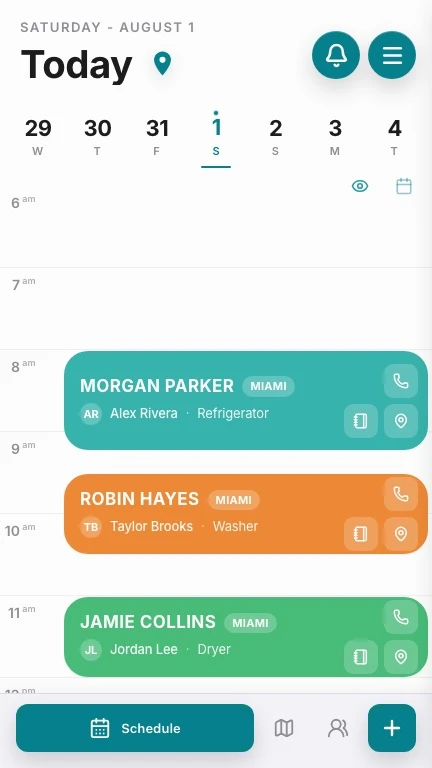
Homi shows the day by hour, keeps customer information with the job, and lets coordination see progress without chasing the technician by phone.
- Jobs organized by time
- Repair-specific statuses
- Team assignment and follow-up
- On-my-way customer message